DicomFlow app icon
Open source · Free · Web + Android / Windows app

DicomFlow

Turn the CT / MRI scans from your hospital into MP4 or GIF that play on any phone or computer.

No more specialist viewer software. Want it right now? Open the web app. Want your images to never leave your device? Use the offline app.

For communication only, not for diagnosis

Web app or app — your choice

Both convert the same kind of hospital imaging archives. The difference is where the conversion happens.

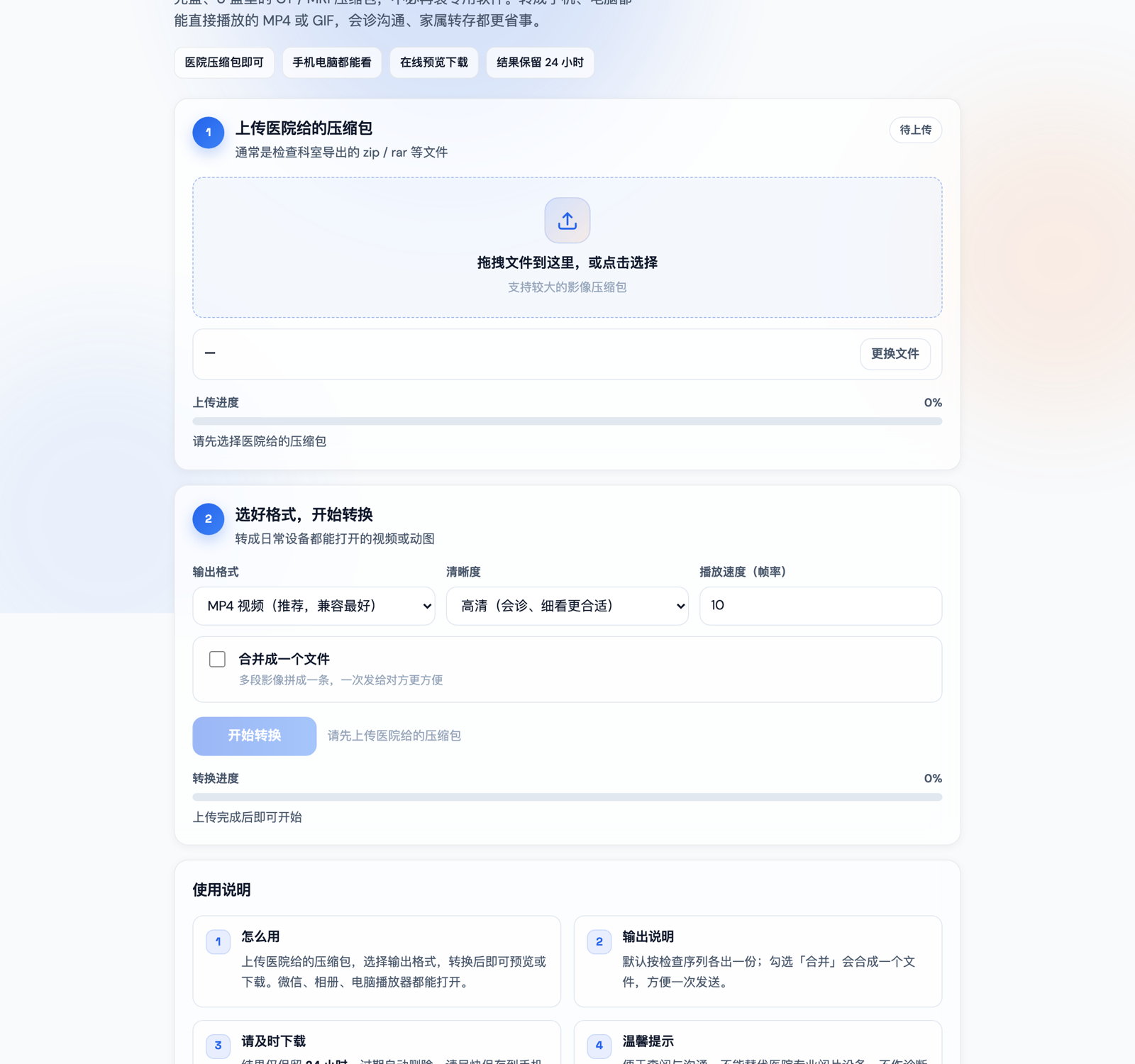
DicomFlow web app (Chinese UI): upload a hospital archive, choose MP4 or GIF and convert

DicomFlow WebNo install

Works in any browser on phone or computer. The easiest way to view a scan just once.

  • Upload a zip / rar archive, convert online, preview and download
  • Choose MP4 / GIF, quality and playback speed, or merge into one file
  • Results are kept for 24 hours by default — save them promptly
  • Self-host with Docker
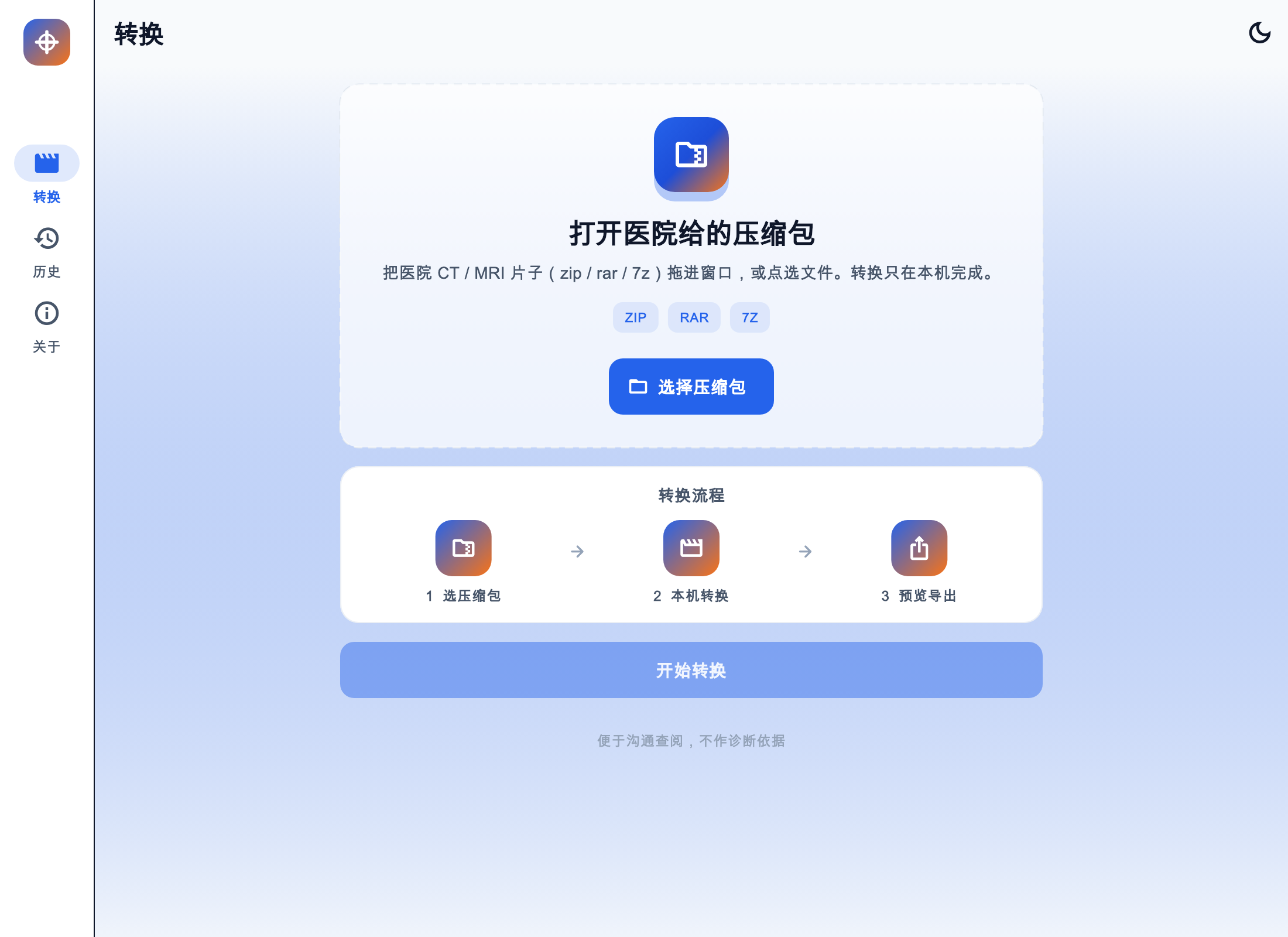
DicomFlow app convert screen (Chinese UI): open a hospital zip, rar or 7z and convert on this device

DicomFlow AppFully offline

Install it on Android or Windows. Everything is converted on your device, and your images never leave it.

  • zip / rar / 7z supported — open directly, no need to unpack first
  • Slice-by-slice preview with pinch or scroll zoom
  • Share a single file or export all results
  • History stays on your device for 1, 7 or 30 days
Web appApp
InstallNothing to install — just use the browserAndroid APK, Windows installer, macOS build to try
Where it convertsOn a server after upload (you can self-host with Docker)On your own device, fully offline
Archive typeszip, rarzip, rar, 7z
Result retentionCleaned up automatically after 24 hours by defaultKept on your device for 1, 7 or 30 days
Best forOne-off use, or when you cannot install softwareSensitive images, frequent use, or offline processing

Privacy note: with the web app, your archive is uploaded to a server for processing. If your images are sensitive, use the offline app, or self-host following the web app repository.

Got your scans? No more hunting for viewer software

The disc or archive from your hospital contains DICOM files that ordinary computers and phones cannot open. DicomFlow turns them into a video you can play and send to a doctor in one step.

Convert to MP4 or GIF

MP4 is best for sending to a doctor; GIF is handy for a quick look in a chat. Multiple series can be merged into one file.

You stay in control

The app converts everything on your device, and web results are cleaned up automatically. No accounts, no cloud storage.

Works with archives directly

Just pick the archive from your hospital — no manual unpacking. The app bundles ffmpeg and 7-Zip, so the Windows installer works out of the box.

Preview, then export

Preview before you save. The app lets you step through slices and zoom with pinch or scroll; the web app offers online preview and download.

Easy to forward to a doctor

Chat apps, photo galleries and desktop players can all open the result, which makes consultations and sharing with family easier.

Free and open source

Both the web app and the app are MIT-licensed. Source code, releases and Docker images are all available on GitHub.

Three steps

Choose the archive

Pick the zip / rar from your hospital (the app also supports 7z), or just drag it into the window.

Pick a format and convert

Choose MP4 (best for sending to a doctor) or GIF, optionally merge series into one file, then start converting.

Preview and save

Download or share once you are happy with the preview. Web results are kept for only 24 hours by default, so save them promptly.

What you can convert

You haveHospital CT / MRI scans: DICOM images (the kind found on the discs hospitals copy for you)
ArchiveWeb app: zip, rar; app: zip, rar, 7z
Files inside.dcm、.dicom、.ima, or DICOM files with no extension
OutputMP4 video or GIF

Tip: Uncompressed, JPEG and RLE images usually convert. JPEG 2000 and some other hospital compressions may not — ask the hospital for an uncompressed or JPEG export.

What it does

  • Convert DICOM into MP4 / GIF for easy playback and sharing
  • Preview the converted result
  • Download, share or export the result

What it does not do

  • Diagnose — no measurements, windowing or MPR
  • Replace your hospital's professional viewing equipment
  • Accounts or cloud storage

DicomFlow is for communication only and is not for diagnosis. It is not a medical device. For diagnosis, use the professional viewer provided by your hospital and follow your doctor's advice.

Get started

Open the web app right away. The app installers are published on GitHub Releases — click through to the latest release and pick the file for your platform.

Web appNo install

Works right in your browser. If the site asks for an access password, request it from the operator.

Open the web app

App · Android

Sideload the APK. Not on Play Store.

DicomFlow-v*-android.apk
Go to download

App · Windows

Standard installer (Start Menu, uninstall). ffmpeg and 7-Zip are included.

DicomFlow-v*-windows-setup.exe
Go to download

The macOS trial build (DicomFlow-v*-macos.zip) is on the app's Releases page too; it is not a store build. To self-host the web app, see the Docker instructions in the web app repository.

Got your scans? Three steps and you can watch them

Free and open source — pick the web app or the app.